
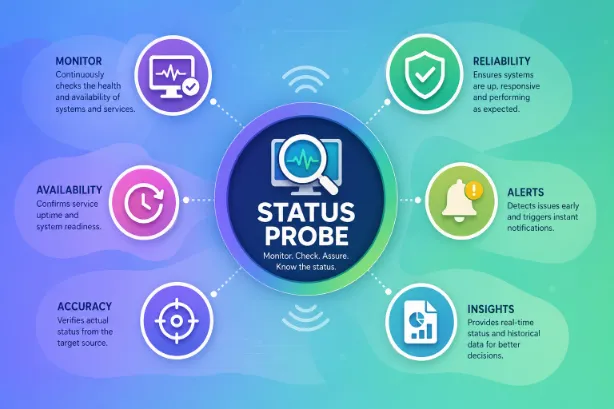
A Status Probe serves as a monitoring mechanism that checks the health, availability, and operational state of a system, application, service, or device. IT teams, software developers, cloud administrators, and network engineers use status probes to verify that systems function properly and respond as expected.
Modern digital environments rely on constant monitoring. A single service outage can affect websites, applications, customer transactions, and internal operations. Status probes help detect problems early and support faster troubleshooting.
From cloud platforms to enterprise networks, status probes act as automated checkpoints that verify system performance at regular intervals.
What Is a Status Probe?
A Status Probe is an automated check that tests whether a service or system remains active and responsive. It sends a request to a target resource and evaluates the response.
The target may be:
- A web server
- An application
- A database
- Cloud service
- Network device
- Containerized workload
- An API endpoint
The probe determines whether the target functions properly and reports the result.
How this Works
The process follows a straightforward sequence:
| Step | Action |
|---|---|
| 1 | Probe sends a request |
| 2 | Target receives the request |
| 3 | Target returns a response |
| 4 | Probe evaluates response quality |
| 5 | System records the result |
| 6 | Alerts trigger if issues appear |
This cycle repeats at scheduled intervals.
For example, a probe may check a website every 30 seconds. A successful response confirms availability. A failed response may trigger notifications for administrators.
Main Types of Status Probes
Different environments use different probe types.
| Probe Type | Purpose |
|---|---|
| Health Probe | Verifies application health |
| Readiness Probe | Confirms service readiness |
| Liveness Probe | Checks whether a process remains active |
| Network Probe | Tests connectivity |
| API Probe | Validates API responses |
| Database Probe | Verifies database access |
| Service Probe | Confirms service availability |
Each probe serves a specific monitoring objective.
Health Probes
Health probes determine whether an application functions correctly.
A healthy application responds within expected parameters. A failed health check may indicate:
- High resource usage
- Application errors
- Service crashes
- Configuration problems
Cloud platforms frequently use health probes to maintain service reliability.
Readiness Probes
Readiness probes verify that an application can handle traffic.
An application may start successfully but still require time for:
- Database connections
- Cache initialization
- Configuration loading
- Dependency validation
A readiness probe prevents traffic from reaching the application until all startup tasks finish.
Liveness Probes
A liveness probe checks whether an application remains active.
Applications occasionally enter frozen or unresponsive states. The process still exists, yet requests fail.
It detects that condition and may trigger an automatic restart.
Benefits of liveness probes:
- Reduced downtime
- Automatic recovery
- Improved reliability
- Better service availability
Status Probes in Kubernetes
Container orchestration platforms rely heavily on status probes.
In Kubernetes environments, administrators commonly use:
- Liveness probes
- Readiness probes
- Startup probes
These probes help maintain application stability across clusters.
| Probe | Function |
|---|---|
| Startup Probe | Verifies successful startup |
| Readiness Probe | Checks traffic readiness |
| Liveness Probe | Detects application failures |
This layered monitoring approach improves workload management.
In Cloud Computing
Cloud providers use probes to monitor virtual machines, applications, and services.
Common monitoring targets:
- Load balancers
- Web applications
- Virtual servers
- Containers
- APIs
Cloud environments depend on automation. Status probes provide the data needed for automated scaling, failover actions, and traffic routing decisions.
For Websites
Website monitoring services rely on probes to verify uptime.
A probe may check:
- Homepage availability
- SSL certificate validity
- Response times
- HTTP status codes
- Content accuracy
Website owners receive alerts if downtime occurs.
Common response codes monitored:
| Status Code | Meaning |
|---|---|
| 200 | Success |
| 301 | Redirect |
| 403 | Access denied |
| 404 | Page missing |
| 500 | Server error |
| 503 | Service unavailable |
Status Probes for APIs
Modern applications communicate through APIs.
A status probe can test:
- API availability
- Authentication responses
- Data accuracy
- Request latency
- Error handling
Reliable API monitoring improves user experience and application stability.
Network Status Probes
Some network administrators use probes to evaluate connectivity between devices.
This may help to identify:
- Packet loss
- Latency issues
- Routing failures
- Connectivity interruptions
Popular network testing methods:
- Ping checks
- TCP connection tests
- DNS validation
- Route analysis
These checks support smooth network operations.
Advantages
Organizations rely on status probes for many reasons.
Major advantages:
- Early problem detection
- Faster incident response
- Reduced downtime
- Better service reliability
- Improved user satisfaction
- Automated monitoring
- Performance tracking
- Resource optimization
Without automated monitoring, technical teams may discover problems far too late.
Metrics Measured by Status Probes
Status probes gather valuable operational data.
Important metrics:
| Metric | Description |
|---|---|
| Response Time | Speed of response |
| Availability | Uptime percentage |
| Success Rate | Successful requests |
| Failure Count | Number of failed checks |
| Latency | Communication delay |
| Resource Usage | CPU and memory consumption |
| Throughput | Data processing volume |
These measurements support informed operational decisions.
Status Probe Configuration Best Practices
A well-configured probe delivers accurate monitoring results.
Recommended practices:
- Use reasonable timeout values.
- Set realistic probe intervals.
- Monitor critical services first.
- Avoid excessive probe frequency.
- Configure alert thresholds carefully.
- Review logs regularly.
- Test probe behavior before deployment.
Proper configuration reduces false alarms and improves monitoring accuracy.
Common Challenges
Despite their usefulness, status probes face several challenges.
Few examples are:
- False-positive alerts
- Temporary network interruptions
- Incorrect thresholds
- Misconfigured endpoints
- Resource consumption
- Delayed notifications
Regular maintenance helps reduce these issues.
Status Probe Security Considerations
Monitoring systems should follow security standards.
Security recommendations:
- Use HTTPS connections.
- Restrict probe access.
- Protect monitoring credentials.
- Encrypt sensitive traffic.
- Monitor authentication failures.
- Review access logs regularly.
Strong security practices protect monitoring infrastructure from misuse.
It’s Future
Monitoring technology evolves alongside modern infrastructure.
Current trends include:
- AI-assisted monitoring
- Predictive failure detection
- Real-time analytics
- Cloud-native observability
- Automated remediation
- Intelligent alert filtering
These advancements help technical teams respond more effectively to operational issues.
Regular probing helps technical teams detect issues faster, reduce downtime, and maintain dependable digital services. As infrastructure grows more complex, status probes remain a central component of proactive monitoring and operational excellence.