
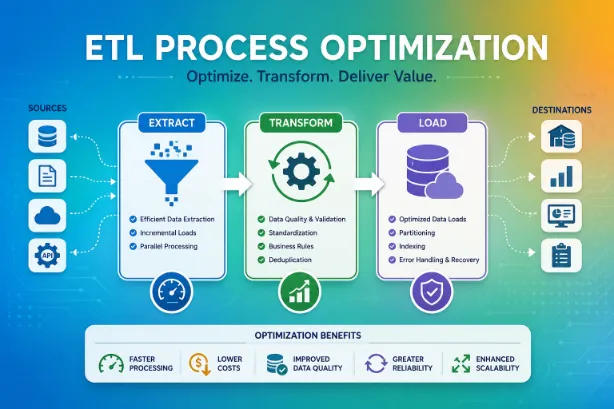
Organizations depend on data for reporting, forecasting, customer analysis, and operational planning. Data arrives from multiple sources such as databases, applications, websites, cloud platforms, and third-party systems. ETL (Extract, Transform, Load) serves as the framework that moves and prepares data for business use.
As data volumes expand, ETL workflows may face slow execution times, resource bottlenecks, duplicate records, and data quality concerns. ETL Process Optimization focuses on improving speed, accuracy, scalability, and resource usage throughout the pipeline.
Why ETL Performance Deserves Attention
A slow ETL workflow affects reporting schedules, dashboard updates, and business decisions. Delayed data processing can reduce productivity and create gaps between data collection and data availability.
Benefits of optimized ETL workflows:
- Faster data processing
- Better system performance
- Reduced infrastructure expenses
- Improved data quality
- Better scalability for future growth
- More reliable reporting cycles
- Lower operational workload
Main Stages of an ETL Pipeline
The ETL framework consists of three primary phases.
| Stage | Purpose |
|---|---|
| Extract | Retrieves data from source systems |
| Transform | Cleans, validates, formats, and prepares data |
| Load | Transfers processed data into a destination system |
Performance improvements can occur at every stage of the pipeline.
Common Challenges in ETL Workflows
Many organizations encounter similar obstacles during data processing.
- Large datasets causing lengthy execution times
- Poor database performance
- Duplicate data records
- Network latency
- Resource contention
- Complex transformation logic
- Data inconsistencies across sources
- Storage limitations
Addressing these issues can dramatically improve pipeline efficiency.
Optimize Data Extraction
Extraction serves as the starting point of ETL processing. Poor extraction methods create delays throughout the workflow.
Several practices help improve extraction speed:
- Extract only required columns
- Filter unnecessary records at the source
- Use incremental extraction methods
- Compress data during transfer
- Schedule extraction during low-traffic periods
Incremental extraction remains one of the most productive techniques. Instead of processing an entire dataset repeatedly, only new or modified records move through the pipeline.
Use Incremental Loading
Full data loads consume processing power and increase execution times.
Incremental loading transfers only records that changed since the previous run. This method reduces:
- CPU utilization
- Memory consumption
- Network traffic
- Processing duration
Example comparison:
| Loading Method | Data Processed Daily | Processing Time |
|---|---|---|
| Full Load | 10 Million Records | 4 Hours |
| Incremental Load | 150,000 Records | 20 Minutes |
The reduction in workload can dramatically improve ETL performance.
Simplify Transformation Logic
Complex transformations create bottlenecks.
Data teams should review transformation rules regularly and remove unnecessary calculations.
Recommended practices:
- Eliminate redundant operations
- Combine related transformations
- Standardize data formats early
- Reduce repeated calculations
- Use reusable transformation components
A cleaner workflow reduces processing overhead and simplifies maintenance.
Improve Database Performance
Databases play a major role in ETL execution speed.
Several optimization techniques improve database response times:
- Create proper indexes
- Archive outdated records
- Partition large tables
- Update database statistics
- Remove unused indexes
Database tuning frequently delivers immediate performance gains without major architectural changes.
Apply Parallel Processing
Modern ETL platforms support parallel execution.
Instead of processing tasks sequentially, multiple operations run simultaneously.
Examples:
- Processing multiple source systems together
- Parallel data validation
- Concurrent transformation jobs
- Simultaneous loading operations
Benefits:
- Reduced execution time
- Better resource utilization
- Faster completion of large workloads
Parallel processing works especially well for large enterprise environments.
Reduce Network Bottlenecks
Network delays can slow data movement between systems.
Strategies that help reduce transfer delays:
- Compress files before transmission
- Use high-speed network connections
- Transfer data in larger batches
- Place processing systems closer to data sources
- Monitor bandwidth utilization
Data transfer optimization becomes more valuable as dataset sizes increase.
Batch Processing Versus Real-Time Processing
Organizations frequently evaluate batch and real-time architectures.
| Feature | Batch Processing | Real-Time Processing |
|---|---|---|
| Speed | Scheduled execution | Immediate updates |
| Complexity | Lower | Higher |
| Infrastructure Cost | Lower | Higher |
| Resource Demand | Moderate | High |
| Data Freshness | Periodic | Near instant |
The appropriate choice depends on business requirements and reporting expectations.
Monitor ETL Workflows Continuously
Performance monitoring helps identify issues before they affect operations.
Metrics worth tracking:
- Job duration
- CPU utilization
- Memory usage
- Error rates
- Throughput
- Data volume processed
Monitoring dashboards provide visibility into pipeline health and help teams identify performance degradation early.
Improve Data Quality During Processing
Poor data quality increases processing time and creates reporting issues.
Recommended actions:
- Validate source data
- Remove duplicate records
- Standardize formats
- Verify mandatory fields
- Detect anomalies automatically
Clean data reduces rework and improves analytical accuracy.
Use Metadata Management
Metadata provides information about data sources, structures, and processing rules.
Benefits of metadata management:
- Better traceability
- Easier troubleshooting
- Faster onboarding of team members
- Improved governance
- Greater transparency
Well-organized metadata simplifies ETL administration across large environments.
Leverage Cloud-Based ETL Platforms
Cloud technologies provide scalable infrastructure for ETL operations.
Advantages:
- Flexible resource allocation
- Automated scaling
- Reduced hardware expenses
- Faster deployment
- High availability
Popular cloud environments support processing workloads that vary throughout the day without requiring permanent hardware expansion.
Automate Routine Tasks
Manual intervention increases operational overhead.
Automation can handle:
- Job scheduling
- Error notifications
- Data validation
- Pipeline deployment
- Resource allocation
Automation reduces human error and creates a more predictable processing environment.
Security Considerations During ETL Optimization
Performance improvements should not weaken security controls.
Security measures may involve:
- Data encryption
- Role-based access controls
- Audit logging
- Secure API connections
- Data masking
Strong security practices protect sensitive information throughout the ETL lifecycle.
ETL Optimization Checklist
The following checklist provides a practical reference:
- Use incremental extraction
- Apply incremental loading
- Optimize database indexes
- Reduce unnecessary transformations
- Monitor performance metrics
- Enable parallel processing
- Compress transferred data
- Validate data quality
- Automate routine processes
- Review workflows regularly
Future Direction of ETL Optimization
Modern ETL environments increasingly rely on cloud computing, machine learning, automation, and advanced monitoring tools. Data teams focus on reducing latency, improving scalability, and maintaining high-quality datasets across expanding data ecosystems.
Organizations that refine ETL workflows can process larger volumes of data with fewer resources while maintaining consistent performance.
What does ETL stand for?
ETL stands for Extract, Transform, and Load. It describes the process of collecting data, preparing it for analysis, and loading it into a target system.
Why does ETL performance slow down?
Common causes involve large datasets, inefficient queries, poor indexing, complex transformations, network delays, and hardware limitations.
What is incremental loading in ETL?
Incremental loading processes only new or modified records instead of reprocessing an entire dataset.
How does parallel processing improve ETL speed?
Parallel processing executes multiple tasks simultaneously, reducing overall execution time and improving resource usage.
Which metrics should data teams monitor?
Important metrics involve job duration, throughput, CPU utilization, memory consumption, error rates, and processed data volume.